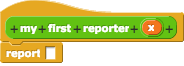
 has automatically been
added to the block definition. This is to remind you that all reporter blocks must report a value.
has automatically been
added to the block definition. This is to remind you that all reporter blocks must report a value.
So far, all of the blocks you've defined have been "command" blocks. These actual carry out an action that
affects the state of the program. For example, the move block makes the sprite move, and
the say block makes the sprite say something. We call these effects "side effects."
Sometimes, we aren't interested in any side effects, and just want a block that performs a calculation for us. These are called "reporters," because rather than causing the program to do something, they simply give us back a value. Many blocks on the "operators" palette are reporters. Here are just a few:
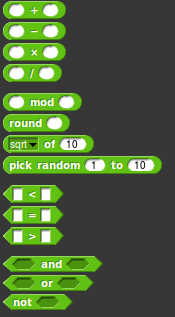
Notice how all of these are rounded, and can't be attached directly to other blocks. Because of this, we
need to use them in combination with other blocks, like say or set. For example:

(I'm sure you've been doing things like this since you started using Snap!)
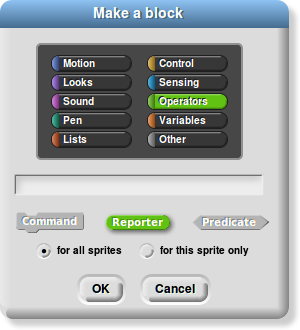
Let's learn how to make our own reporter blocks!
has automatically been
added to the block definition. This is to remind you that all reporter blocks must report a value.
Let's take a look at an example:
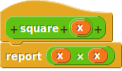
This block will take in a parameter x, and report x2.
Here's a more complex example, using if:
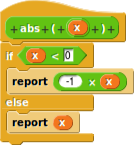
This block is a home-made version of the abs (absolute value) block that we saw earlier. Notice
that it contains two report blocks. Reporter blocks can have as many reports as
you want/need.
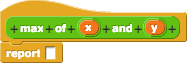
Let's try writing our own reporter block! Try writing a max block that takes in two numbers and
reports the larger of the two. Hint: you'll need to use if.
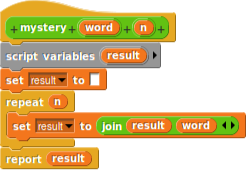
Here's a more complex block that we wrote. Predict what it will report when run with inputs "hello" and 5.
"Predicates" are special kinds of reporter blocks that only report true
or false. You'll see in the next slide how to write them.